NTHU Personal Course Record - Visualize Your Academic Journey
Tired of the mundane and never-ending list of course records in your school system? Look no further than the NTHU Personal Course Record add-on for Chrome. This extension allows you to visualize your course records in a visually appealing and interactive way.
Before using the add-on, you need to log in to your school system and access the grade inquiry section. Then, simply open the add-on. If you're concerned about privacy, you can choose to delete the data as well.
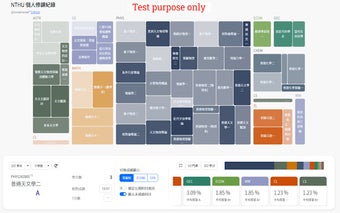
All the courses you have taken or are currently taking will be represented in a tree-like structure composed of colorful blocks. Each color represents a different department, with the depth of color indicating the grade level (darker for higher grades) and the size of the blocks representing the credit hours.
Courses such as physical education, service learning, and conduct are not included in the calculation.
You can click on different semesters/years to view your course history for each specific period. A bar chart displays the proportion of different departments in the current tree structure and their average grades. Clicking on buttons allows you to toggle the displayed information.